中文 Back to Home

Quick Start

Installation & Environment

CastClaw is installed via npm and requires Bun, Python, and uv at runtime. Prepare the runtime first, then launch the CLI for a quick smoke test.

Prerequisites: Bun ≥ 1.3.11, Python ≥ 3.10, uv, and at least one LLM API key.

Dependency Version Purpose
Bun ≥ 1.3.11 Runtime and package manager
Python ≥ 3.10 ML backend for forecasting models
uv Latest Python dependency management
GPU (optional) CUDA 12.8 Deep learning acceleration
Ascend NPU (optional)Recommended Atlas 800 A2/A3 (Ascend HDK 25.5.1) Huawei Ascend acceleration for deep learning. Recommended if you want to try domestic compute infrastructure.
# Install the CastClaw CLI
npm install -g castclaw

# Verify the base runtime
castclaw --version
python --version
uv --version

# Sync Python backend dependencies
cd python && uv sync

You can configure your LLM through environment variables or castclaw.json. Either approach works:

export ANTHROPIC_API_KEY=your_key_here
export OPENAI_API_KEY=your_key_here
export DEEPSEEK_API_KEY=your_key_here
Recommendation

For your first run, connect only one provider you already know well. Avoid debugging several API stacks at the same time.

First Forecast Task (5-Minute Walkthrough)

We recommend starting with load.csv (fields: TIMESTAMP / LOAD, hourly frequency) to walk through the full workflow quickly. The goal is to understand the system rhythm, not to squeeze out the absolute best score on day one.

1

Prepare a clean working directory

Put load.csv in a dedicated experiment folder so it does not share .forecast/ state with other tasks.

2

Launch the CLI

Run castclaw inside that directory. On the first run, confirm the model and budget settings.

3

Enter the task in Planner

Specify the target column, time granularity, forecast horizon, and metrics. The more concrete the description, the better the Skill draft.

4

Review the Skill draft

Check whether the model families, search space, and risk notes are reasonable before continuing.

5

Watch iterations and the final report

Forecaster runs the experiment loop, and Critic produces final-report.md. Watch for possible human-in-the-loop pauses.

mkdir my-run && cd my-run
# After placing load.csv in the current folder
castclaw
Sample Planner prompt

Please forecast the next 24 hours of power load using load.csv; the time column is TIMESTAMP, the target column is LOAD, the evaluation metrics are MAE and MAPE, and the experiment budget should stay within 20 runs.

CLI Basics

The CLI is the command-line workspace where the three agents collaborate. The key is to know which stage you are in and which agent owns the next move.

Shortcut / Area Purpose What to watch
Ctrl+1 Switch to Planner Check whether task definition, analysis output, and Skill drafts are coherent.
Ctrl+2 Switch to Forecaster Watch for stagnation, improvement pace, and human-in-the-loop triggers.
Ctrl+3 Switch to Critic Verify that the report covers breakdowns, evidence, and concrete next steps.
Task status panel Inspect current stage and budget Confirm whether you are in Init, Analysis, Forecasting, or Report.
Common misunderstanding

The CLI is a stage-driven task workspace, not a one-shot chat box. The important question is always: which stage are we in, and who acts next?

CLI Reference

castclaw Launch Options

CommandPurpose
castclaw Launch CastClaw in the current directory and take over the forecasting task in this project context.
castclaw --model anthropic/claude-sonnet-4-6 Explicitly select the primary model at launch time and temporarily override the default configuration.
castclaw --version Print the current CLI version, useful when you are debugging environment mismatch.

Shortcut Cheat Sheet

ShortcutAction
Ctrl+1Switch to Planner
Ctrl+2Switch to Forecaster
Ctrl+3Switch to Critic

Once these three shortcuts become muscle memory, the workflow feels natural: define and review in Planner, observe convergence in Forecaster, and judge evidence in Critic.

forecast_state / forecast_task Tools

forecast_state

  • forecast_state init: initialize the task and create the .forecast/ workspace.
  • Stage transitions are enforced. You should not skip them if you want the run to remain traceable.

forecast_task

  • Helper tool for task definition around task.json.
  • Useful during Init when you need to confirm target column, time column, forecast horizon, and metrics.

Configuration

CAST.md Policy File

This is the project-level policy file automatically injected into every agent context. It should hold stable, long-lived rules that every stage should know.

FieldDescription
banned_modelsList of banned models or model families that should be excluded immediately.
max_experimentsMaximum number of experiments, which caps the Forecaster exploration budget.
no_improve_thresholdNumber of non-improving rounds before a human-in-the-loop pause is triggered.
eval_metricPreferred evaluation metric such as MAE, MAPE, or RMSE.
domain_notesDomain background injected into every agent context to keep judgments aligned with business reality.

castclaw.json Parameters

This is the task-level or project-level default configuration entry point. It is a good place to share baseline model and budget settings across a team.

{
  "model": "anthropic/claude-sonnet-4-6",
  "light_model": "anthropic/claude-haiku-4-5",
  "max_experiments": 20,
  "no_improve_threshold": 5
}
Configuration tip

Put your highest-quality model in the primary slot and a lighter model on the auxiliary analysis path to balance quality and speed.

Model Providers (LLM Configuration)

CastClaw follows a Vercel AI SDK style integration pattern, so you can connect multiple providers depending on network conditions, budget, and deployment constraints.

Global providers

Anthropic Claude, OpenAI GPT, and Google Gemini fit environments with stable international API access.

China-friendly providers

DeepSeek, Qwen, and GLM fit domestic network environments or teams that prefer locally accessible endpoints.

Deployment options

Direct APIs, self-hosted inference services, or Ascend-backed compute APIs all fit the same orchestration model.

Core Concepts

Architecture Overview

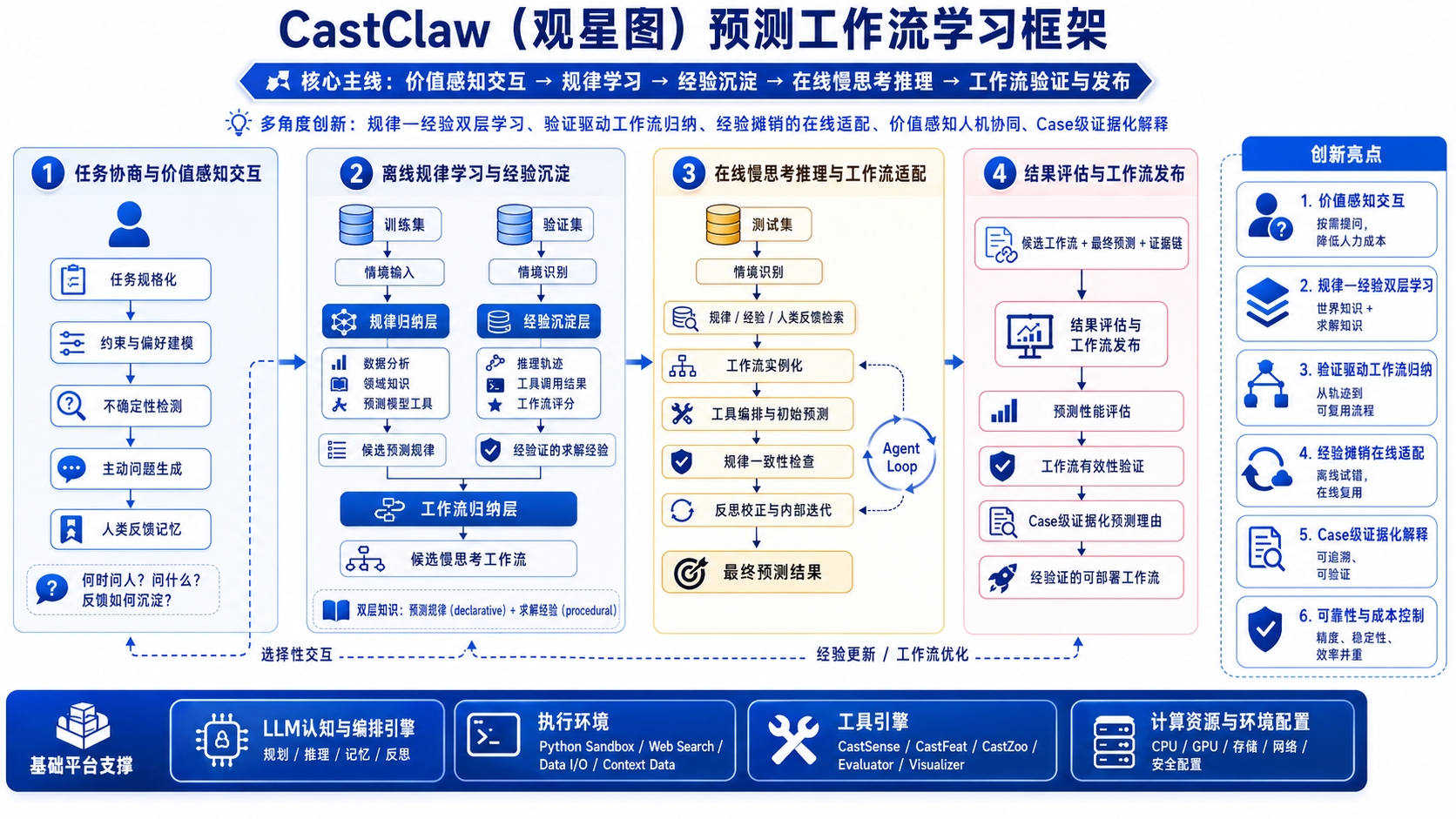
CastClaw uses a four-layer collaborative architecture: CastRuntime handles execution and state, CastSkill handles strategy selection, the plugin ecosystem provides concrete capabilities, and TimeEmbed aligns representations and experience across tasks.

User Task
  ↓
CastRuntime (execution loop, context management)
  ↓
CastSkill (strategy retrieval and selection)
  ↓
CastSense → CastFeat → CastZoo
  ↓
Reflection / Report
CastClaw system architecture
LayerResponsibilityWhen You Touch It
CastRuntime Task context management, phase progression, agent loop control, and file-state synchronization. When starting a task, switching phases, or resuming a paused run.
CastSkill Retrieves or generates strategies from analysis results and decides model families and search spaces. When reviewing Skill drafts, curating experience, or reusing prior strategies.
Plugin Ecosystem Uses CastSense, CastFeat, and CastZoo for diagnostics, representation building, and model orchestration. When interpreting results, designing features, or choosing model paths.
TimeEmbed The capability foundation for cross-task representations, similar-pattern retrieval, and experience alignment. You usually do not operate it directly, but it affects Skill retrieval quality.

Multi-Agent Collaboration (Planner / Forecaster / Critic)

The three agents form a strict assembly line. Treat them as different roles, not interchangeable chat windows.

AgentCore ResponsibilityKey Behaviors
Planner Task definition, data diagnostics, and phase orchestration. Runs qualitative and quantitative analysis in parallel, writes the pre-forecast report, and drafts candidate Skills.
Forecaster Experiment loops and strategy iteration. Reads history, selects configs, calls CastFeat and CastZoo, records reflections, and triggers Human in the Loop when needed.
Critic Result aggregation and final reporting. Compares model-family performance, generates visualizations and structured conclusions, and produces final-report.md.

Agentic Workflow

CastClaw breaks forecasting into five tightly constrained phases. Phase transitions are enforced by tools and file protocols rather than LLM self-discipline, which makes the workflow traceable and auditable.

1

Initialization

Freezes task.json and creates the .forecast/ working directory. Every later experiment stays bound to the same task definition.

2

Pre-forecast Analysis

Runs two tracks in parallel: qualitative domain analysis through WebSearch and quantitative diagnostics through CastSense. The outputs merge into the pre-forecast report that drives Skill generation.

3

Skill Audit

Planner pauses after drafting 2 to 4 candidate Skills, waiting for human review of model routes, risks, and search spaces before experiments begin.

4

Forecasting

Read the best prior result → choose a config → build representations with CastFeat → train and evaluate through CastZoo → record reflections → check budget → repeat. Human in the Loop is triggered when progress stalls.

5

Post-forecast Report

Critic consolidates experiment artifacts, performance breakdowns, and visual explanations into a structured final-report.md.

Design focus

CastClaw is not differentiated by "running more models." It is differentiated by analyzing first, reviewing second, iterating third, and allowing humans to correct the path at critical points.

Human in the Loop

What Human in the Loop Means

When Forecaster shows no improvement across multiple rounds, produces abnormal results, or follows a strategy that clearly conflicts with domain knowledge, the system pauses at a recoverable checkpoint and waits for human feedback. This is not failure. It is a forced correction window.

Checkpoint 1: Confirm the task setup

Confirm the target column, time column, forecast horizon, evaluation metric, and resource limits so a flawed task definition does not get amplified downstream.

Checkpoint 2: Review the strategy Skill

Confirm that the model families, parameter search spaces, and risk notes are reasonable before large-scale experiments are launched in the wrong direction.

Checkpoint 3: Intervene during stagnation

Inject domain priors, block ineffective model families, or add new feature hypotheses before resuming iteration.

Do not treat Human in the Loop as a rerun button

Effective intervention changes the strategic assumptions: constrain model families, narrow the search space, explain anomalous dates, or add external constraints.

Skill Audit: How to Intervene

When reviewing a Skill, the key question is whether the strategy truly fits the current task, not whether the YAML looks neat. Focus on applicability, search space, and risk notes.

What to review

  • Whether the applicability conditions match the data profile, such as strong seasonality, long sequences, or stable frequency.
  • Whether the parameter search space is too broad and likely to waste budget on low-value regions.
  • Whether the risk warnings cover known failure modes such as overfitting on small samples, distribution drift, or nighttime zeros.

Recommended interventions

  • Remove clearly unsuitable model families directly instead of spending budget to prove they are wrong.
  • Add known holidays, equipment changes, or policy events to the domain notes.
  • Narrow critical search dimensions such as learning rate, window length, or patch length.

When to Confirm Results and Intervene

The most valuable moments for human review are when directional signals change, not after every single experiment round.

No improvement across rounds Results conflict with domain knowledge Best model family changes Anomalous dates matter materially Budget is nearly exhausted
Practical rule

If your intervention cannot change the next strategy decision, do not step in yet. Human in the Loop creates value by changing the path, not by repeatedly confirming the current state.

Plugin Toolbox

CastSense: Data Diagnostics

CastSense answers the question, "What state is this series in right now?" It turns trend, seasonality, anomalies, and distribution changes into structured knowledge that Planner can use to generate strategies.

Trend and seasonality detection

Detects long-term trends, daily cycles, weekly cycles, and multiscale periodicities to help decide which model path should come first.

Anomaly and drift localization

Finds change points, outliers, non-stationarity, and distribution drift, providing evidence for risk prompts and Human in the Loop interventions.

Structured outputs

Turns diagnostics into structured knowledge that later Skill retrieval, feature design, and model orchestration can all consume.

CastFeat: Feature Construction

CastFeat answers the question, "How should the data be transformed into model-ready representations?" It converts raw time series into forms that better match downstream models.

lag / rolling statistical features frequency-domain and multiscale representations patch / token embedding model-ready representation
How to think about it

CastFeat is not "manual feature engineering one more time." It unifies domain features, statistical features, and foundation-model input formats into a single representation-building pipeline.

CastZoo: Model Orchestration

CastZoo answers, "Which models should be used, and how should they be combined?" It is not only a model repository. It also handles strategy-aware scheduling.

Supported model families

Statistical models such as ARIMA, ETS, and Theta; machine learning models; deep learning models such as Informer and PatchTST; and foundation models such as Chronos, TimesFM, and Moirai.

Supported strategies

Single-model runs, multi-model ensembles, coarse-to-fine two-stage scheduling, or using foundation-model outputs as priors.

Skill System

What a Skill Is

A Skill is a reviewed strategy template. It describes which model families, search spaces, feature templates, and known risks fit a given class of data under specific conditions. It is the key asset layer that lets the system keep evolving.

Carry forward proven experience

Preserve routes that have already been validated in experiments instead of starting from scratch every time.

Guide future tasks

Narrow the model space for new tasks so Forecaster starts from a more reasonable baseline.

Keep humans in control

Review before use so the system evolves on top of trusted strategies instead of automatically accumulating noise.

Skill File Structure

Skills are expressed in YAML. The core fields are applicability conditions, model family, search space, feature template, and risks.

name: deep_learning_periodic
applicable_conditions:
  - strongly seasonal data
  - sequence length > 5000
model_family: deep_learning
models: [PatchTST, iTransformer]
search_space:
  learning_rate: [1e-4, 5e-4]
  patch_len: [16, 32, 64]
feature_template: patch_token
risks:
  - high overfitting risk when data volume is insufficient
domain_notes: ""
Review focus

Start with applicable_conditions and risks. These two parts most directly determine whether the Skill should be used for the current task.

How to Review and Curate Skills

  1. Planner drafts 2 to 4 candidate Skills from the pre-forecast analysis.
  2. Humans review the model route, applicability conditions, and risk notes, editing them directly when needed.
  3. Approved Skills enter .forecast/skills/ for reuse in the current and similar tasks.
  4. The library evolves over time and gradually becomes a team-level strategy asset.
Review principle

Keep a small number of high-quality Skills rather than accumulating a large set of low-signal strategies. The value of the Skill library is trustworthiness, not size.

/cast-creation Command

Interactively generates the CAST.md project-constraint file. Use it before a task starts to define disallowed models, budget caps, evaluation preferences, and domain notes.

When to use it

Use it when you already know which models should be excluded, how many experiments the budget allows, or which domain notes must be injected for every agent.

What problem it solves

It avoids repeating the same constraints verbally in every run and reduces the chance that agents forget critical limits in later phases.

Examples

These three cases cover load, solar, and financial time series. The point is to build intuition for how different data shapes map to different strategies. Focus on the data profile, the recommended Skill path, and where Human in the Loop matters.

Power Load Forecasting (load.csv)

load.csv is the best starter dataset for a first demo. It contains hourly load values with stable daily and weekly cycles.

Data profile

Hourly frequency, roughly 15,000 samples, strong daily seasonality at 24 hours, strong weekly seasonality at 168 hours, and clear summer and winter peaks.

Recommended strategy

Start with a combined deep_learning path using PatchTST and iTransformer plus a foundation path using Chronos.

Expected outputs

If you see pre-forecast.md, the experiment directories, and final-report.md, the main workflow is running end to end.

Solar Power Forecasting

Solar generation combines strong daily seasonality, fixed nighttime zeros, and strong weather sensitivity. It is a canonical case where domain knowledge needs to intervene.

Data profile and diagnostic focus

This is hourly data from the GEFCom2014 Solar Track. CastSense should pay special attention to nighttime zeros, abrupt weather changes, and seasonal shifts.

Recommended strategy and Human in the Loop

Start with a statistical plus foundation path using Theta together with TimesFM or Moirai. Human intervention matters most when labeling long cloudy periods and weather-abnormal days.

Financial Time-Series Forecasting

Financial series are volatile, non-stationary, and sensitive to external shocks. They are not a good fit for blindly committing to a single deep-learning route and require stronger risk awareness and external-event injection.

Recommended strategy

Use a conservative statistical + foundation ensemble so the full budget is not concentrated on one path.

Where humans should step in

Mark earnings releases, policy announcements, and macro shocks, then pay close attention to CastSense alerts on distribution drift and structural breaks.

FAQ & Troubleshooting

Common Questions

How do I switch LLM providers?

Update the model configuration in castclaw.json or switch the relevant environment variables.

How do I continue after a Human-in-the-Loop pause?

Enter feedback in the Forecaster tab and submit it. The system resumes in the current context without reinitializing from scratch.

Where are Skill files managed?

They live in .forecast/skills/ by default. Stable reviewed Skills should be promoted into a shared team asset library.

Why are results unstable?

First check whether the task definition or budget is too small, then check for unlabeled anomalous dates, and only after that consider model optimization.

Environment Troubleshooting

SymptomWhat to Check
Bun version is too old Upgrade to 1.3.11 or later, reopen the terminal, and verify with bun --version.
Python backend errors Enter the Python directory and run uv sync to make sure dependencies are installed correctly.
API key is not taking effect Check whether the environment variable has been exported in the current shell, or confirm that castclaw.json overrides the model settings.
A phase will not advance Check whether .forecast/ is missing required files, especially task.json and the report artifacts for each phase.